Contact O2 UK Customer Service
All O2 phone numbers, live chat and support channels in one place
Ways to Contact O2
Choose the contact method that works best for you. O2 offers multiple ways to get help with your account, billing, technical issues and more.
O2 Customer Service Phone Numbers
All the O2 phone numbers you need to speak directly to customer service. Most calls from your O2 mobile are free.
Pay Monthly Customers
Pay As You Go Customers
O2 Business Customers
Specialist Support Lines
Pro Tips for Faster Service
- Best time to call: 8am Monday morning typically has the shortest wait times
- Skip the menu: Stay silent for 15 seconds when the automated system answers to be transferred to a human faster
- Say keywords: Saying "upgrade", "lost phone", or "cancel" can route you to the right team quickly
- Have your details ready: Keep your O2 account number or phone number handy
O2 Customer Service Opening Hours
O2 phone lines are staffed during the following hours. Outside these times, you can use the My O2 app or automated phone service.
| Day | Phone Support | Live Chat | Store Hours* |
|---|---|---|---|
| Monday | 8am - 9pm | 8am - 10pm | 9am - 6pm |
| Tuesday | 8am - 9pm | 8am - 10pm | 9am - 6pm |
| Wednesday | 8am - 9pm | 8am - 10pm | 9am - 6pm |
| Thursday | 8am - 9pm | 8am - 10pm | 9am - 6pm |
| Friday | 8am - 9pm | 8am - 10pm | 9am - 6pm |
| Saturday | 8am - 8pm | 8am - 8pm | 9am - 6pm |
| Sunday | 8am - 6pm | 9am - 6pm | 11am - 5pm |
*Store hours vary by location. Find your local O2 store for exact times.
24/7 Self-Service Options
Even outside opening hours, you can:
- Check your balance and usage in the My O2 app
- Pay your bill online at o2.co.uk
- Report a lost or stolen phone (limited service available)
- Browse help articles on o2.co.uk/help
O2 Live Chat Support
O2's live chat is often the fastest way to get help without waiting on hold. You can chat with both AI assistants and human agents.
Live Chat Tips
- Be specific: Clearly describe your issue in the first message
- Request a human: Type "speak to agent" if you need human help
- Save the transcript: You can email the chat transcript to yourself for records
- Busy times: Chat is busiest 12pm-2pm and 5pm-7pm on weekdays
My O2 App - Self-Service Support
The My O2 app lets you manage your account, check usage, pay bills and get support all from your smartphone.
What You Can Do in the My O2 App
Download the My O2 App
O2 Email Addresses
While O2 doesn't offer general email support, there are specific email addresses for complaints and data requests.
Complaints Review
complaintreviewservice@o2.comUse this if your complaint hasn't been resolved after 8 weeks or you've received a deadlock letter.
Data Rights Team
datarightsteam@o2.comFor GDPR requests including subject access requests and data deletion.
Executive Office
For escalated complaints, you can write to:
Complaint Review ServiceTelefónica UK Limited
260 Bath Road
Slough
SL1 4DX
How to Make an O2 Complaint
If you're not happy with O2's service, follow this process to ensure your complaint is handled properly.
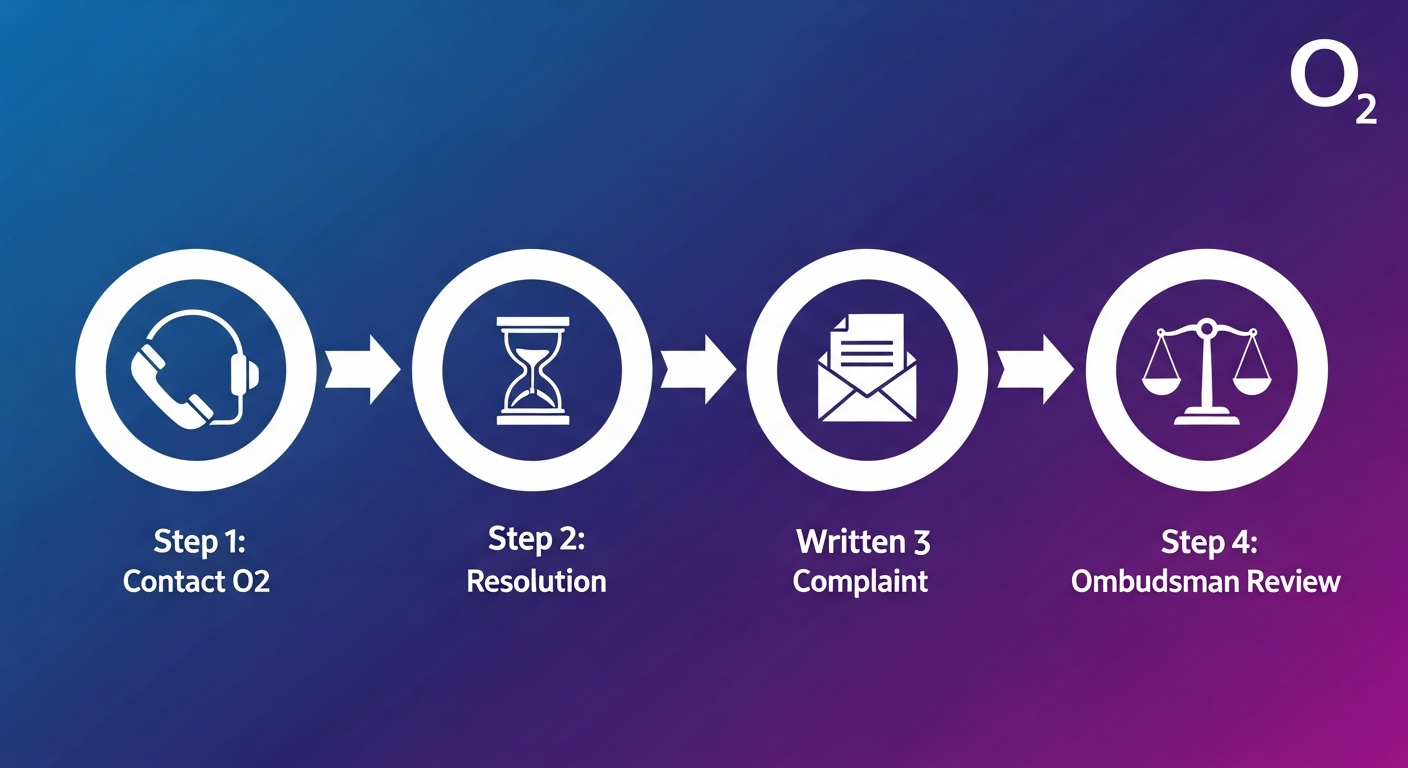
Contact Customer Service First
Call 202 from your O2 phone or 0344 809 0202 and explain your issue. Ask for a complaint reference number.
Wait for Resolution
O2 has 8 weeks to resolve your complaint. They'll investigate and contact you with an outcome.
Request a Deadlock Letter
If you're not satisfied after 8 weeks, or O2 can't resolve your issue, request a deadlock letter to escalate further.
Contact the Ombudsman
Take your complaint to Ombudsman Services (free) for an independent review and binding decision.
Prefer Face-to-Face Help?
Visit one of over 300 O2 stores across the UK for in-person support, device demonstrations, and account help.
Find Your Nearest O2 Store
Contact O2 on Social Media
O2's social media team responds to customer queries on multiple platforms. This can be a quick way to get help, especially for simple questions.
Social Media Response Times
O2 typically responds to social media messages within 1-2 hours during business hours. For urgent issues like lost phones, calling is faster.